Built for the way writers think.
A fast, lightweight writing space that keeps your ideas organised, connected, and easy to navigate. Build stories page by page, then move through them like your own private web of ideas.
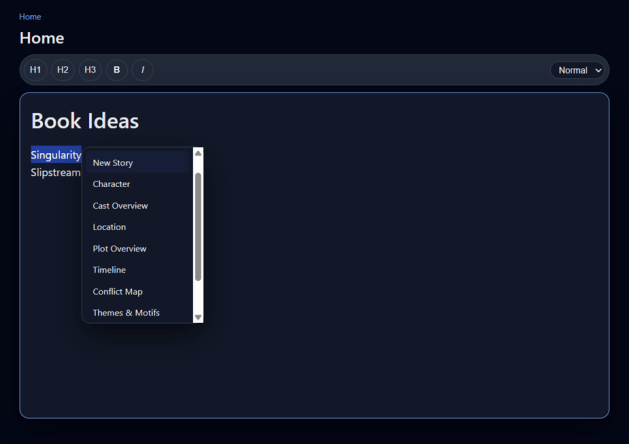
Writers Notepad began with a simple need: a quick, structured place to organise stories without turning the writing process into software administration.
If your notes live everywhere, your stories grow faster than your folders, or one idea keeps leading to three more, Writers Notepad gives those connections somewhere to live. Create a page from a word or phrase, follow the link, then find your way back through breadcrumbs, tabs, backlinks, and search.
Less filing. More finding.
Instant page creation
Double-click selected text and choose a page type, including Blank Page, Character, Location, Scene, and more.
Smart linking
Turn a word or phrase into a linked page, then click the dotted underline whenever you want to jump there.
Drag-and-drop import
Drop one or several .txt files into the app. Each becomes a page, with a link inserted into the page you are working on.
Tabs & split view
Keep several pages open, or place them side by side. Each split pane has its own editor and breadcrumb trail.
Breadcrumb navigation
Move back through the trail of pages you have visited, while each tab remembers its own navigation history.
Search, backlinks & orphans
Find pages quickly, see which pages point to the one you are reading, and surface pages with no incoming links.
Autosave
Your work saves automatically as you type, so the app can stay out of the way while the words keep moving.
Backup & restore
Export all pages into a single .pnote backup file and import it again later when you need to restore or move a project.
Markdown & text export
Export the current page as Markdown or save it as .txt. You can also print the current page or the whole project.
If you think in connections, it feels natural.
Same connected thinking. Fewer decisions.
Prefer something even simpler? PNotes is the ultra-light companion to Writers Notepad. No story presets or writing templates. Double-click and start with a blank page.
It keeps the linked-page workflow, tabs, split view, breadcrumbs, search, backlinks, orphans, import, export, print, autosave, and backup tools, while leaving the story-specific structure behind.
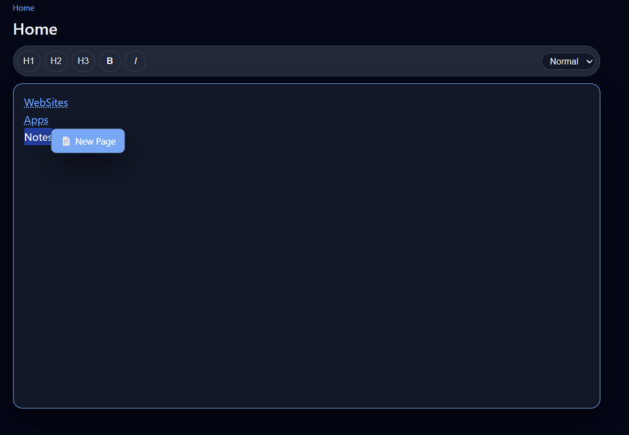
Writers Notepad vs PNotes
| Feature | Writers Notepad | PNotes |
|---|---|---|
| Page creation | Choose Blank, Character, Location, Scene & more | Instant blank page |
| Smart linking | Yes · words & phrases | Yes · same linked-page idea |
| TXT import | Yes · drag, drop or browse | Yes |
| Tabs & split view | Full support | Full support |
| Breadcrumbs | Yes | Yes |
| Search / backlinks / orphans | Yes | Yes |
| Story presets | Yes · built for storytelling | No · intentionally minimal |
| Export & print | Markdown, text, .pnote backup & print | Markdown, text, .pnote backup & print |
| Best suited to | Stories, worlds, characters & connected research | Quick notes & simple connected organisation |
| Price | $2 | $2 |
Indie Writer
Outgrowing linked notes? Indie Writer is the complete creative writing studio — story, characters, timeline, murder board, editing, styling, and publishing tools in one place.
Give every idea somewhere to go.
Start with Writers Notepad for story-focused structure, or choose PNotes when all you want is a clean blank page and a web of connected notes.
